



Choosing revenue management software starts with understanding what your hotel needs and then comparing how different systems support those priorities. The right revenue management software, commonly called an RMS, or revenue management system, needs to fit your hotel's demand patterns, pricing strategy, existing technology and the way your team actually works.
Advanced features can add a lot of value, but the right RMS also needs to fit your PMS (property management system), pricing strategy, team and day-to-day workflow. Revenue management software uses data such as booking pace, historical demand, occupancy, competitor rates and local demand signals to support better room-pricing decisions. Unlike a PMS, which manages reservations and hotel operations, or a channel manager, which distributes rates and availability, an RMS helps determine what your room prices should be.
If you are already considering revenue management software for your hotel, the bigger question is therefore not what the technology does. It is how to identify the solution that best fits your property. This guide will help you define what you need, compare RMS providers using consistent criteria, evaluate systems during a demo or test phase and make a more confident buying decision. Where useful, we'll also show how happyhotel approaches a particular requirement as a concrete example, but the evaluation criteria apply whichever providers make your shortlist.
In Short: What Matters Most When Choosing an RMS?
Start with the outcome you want the software to improve, then evaluate providers based on PMS integration and data quality, demand forecasting, pricing controls, automation, transparency, usability and support.
Define your non-negotiable requirements before talking to vendors, compare providers against the same criteria and, wherever possible, evaluate the strongest options using your own hotel data. The best RMS is not necessarily the one with the longest feature list. It is the one that fits your hotel's data, pricing strategy and everyday operation.
Signs Your Hotel Has Outgrown Manual Pricing
Revenue management software can become especially valuable when your hotel is managing more dates, demand changes and pricing decisions than the team can comfortably review manually. It may be worth evaluating an RMS if several of these situations sound familiar:
- Demand changes significantly depending on season, weekday, events or booking pace.
- Your team regularly checks competitor prices manually.
- Most pricing decisions depend on one person's time and availability.
- Demand can change more frequently than the team has time to review rates.
- Your hotel sometimes sells out much earlier than expected, suggesting there may have been room to react to demand sooner.
- Discounting is often used to stimulate bookings without a clear view of whether it is actually necessary.
- Forecasting and pricing still depend heavily on experience or gut feeling.
- You manage several properties and need more consistency across them.
For a property with very stable demand, little variation in booking patterns and rates that rarely need to change, the immediate impact of an RMS may be smaller. In that case, it can make sense to strengthen the underlying revenue management process first: How to start with revenue management for the hotel business walks through exactly that.
The more useful question to ask yourself is therefore not simply, "Do we need an RMS?" It is: would better data, faster pricing decisions and automation help us respond more effectively to changing demand and manage revenue with less manual work?
That can be true for a hotel with 5 rooms just as much as for one with 100. If the answer is yes, the next step is to define what you actually want the software to improve.
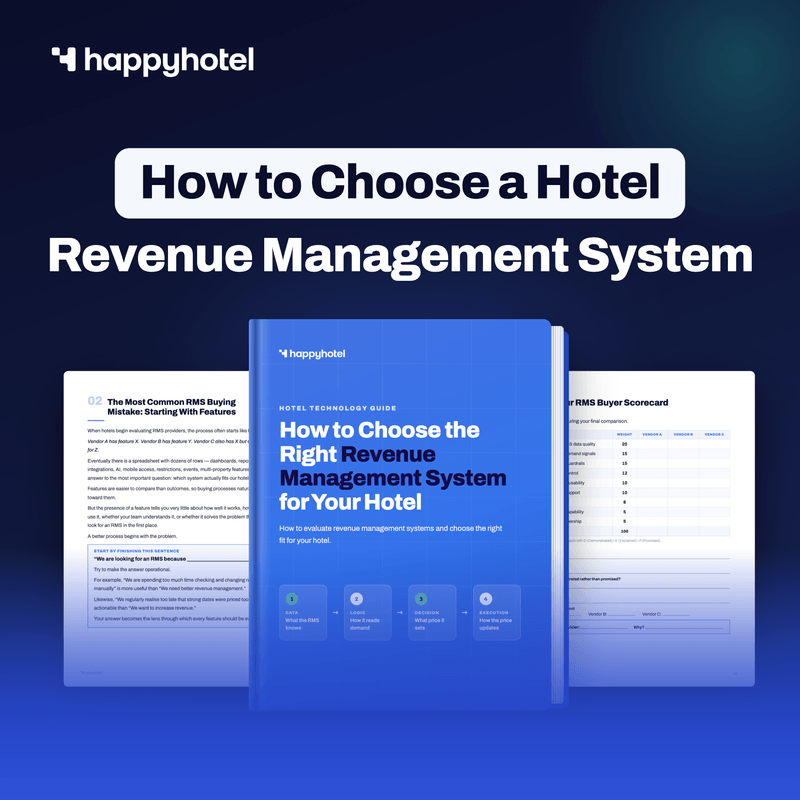
A practical guide to choosing the right revenue management system: what to look for, how to weigh it for your hotel, and a fillable scorecard to compare vendors side by side.
Start With the Outcome You Want
Before starting vendor demos, decide what success should look like for your hotel. Defining that first gives you a clearer basis for deciding which capabilities and workflows matter most.
For most hotels, the goal falls into one or more of three areas.
Increase Revenue
If your goal is more revenue, the practical question isn't just "are we tracking the right KPIs" - it's "what would we actually do differently if we saw the numbers move."
For example, if occupancy is already high for a future weekend while RevPAR is underperforming expectations, that may indicate that rates have not kept pace with demand. The useful action is to investigate the remaining inventory, booking pace and market conditions while there is still time to adjust rates. Similarly, if ADR is falling while occupancy remains broadly stable, it is worth investigating whether discounts or promotions are reducing average room value without producing enough additional demand to justify them.
The KPIs worth tracking for this goal include:
- RevPAR (revenue per available room): combines occupancy and room rate, helping you see whether your available inventory is generating sufficient room revenue.
- ADR (average daily rate): read it alongside occupancy, not alone - a rising ADR with falling occupancy may indicate you've priced yourself out of some demand rather than captured more value.
- Pickup: shows how many new bookings have been received during a given period. An acceleration in pickup can be one of the clearest signals that demand for a particular date is strengthening.
- Booking pace: compares how quickly bookings are accumulating for a future date. Comparing pace with relevant historical periods can help show whether demand is developing faster or slower than expected.
- Occupancy: shows the share of available rooms that have been sold. It helps you understand how full the hotel is for a given date, but the number only becomes useful when you look at when that occupancy was reached. 70% occupancy three months before arrival can mean something very different from 70% on the day of arrival.
The role of an RMS is not simply to display these numbers. It should help your team translate changing demand into pricing decisions while there is still time to act.
Make Pricing More Consistent
Manual pricing often becomes inconsistent simply because people have limited time. A standard double and a family room in the same hotel might, for example, receive very different levels of attention: one room type gets reviewed every few days because it sells frequently, while another remains unchanged for weeks.
An RMS can apply the same underlying pricing logic and defined boundaries across room types and dates, reducing the likelihood that parts of your inventory are ignored simply because nobody had time to review them. The same applies across properties if you run more than one hotel: instead of each property's pricing quality depending on how experienced or attentive that property's manager happens to be, every property can follow a more consistent pricing approach.
If this is your goal, forecast quality, recommendation transparency and clear pricing guardrails become especially important. A system that is easy to understand and work with can help the team apply pricing decisions more consistently.
Save Time
Manual revenue management can involve checking competitor rates across OTAs, reviewing booking and occupancy data, identifying dates that require attention and then adjusting rates across multiple room types and dates. The more frequently this has to happen, the more difficult it becomes to manage consistently alongside everything else involved in running a hotel.
An RMS can reduce that manual workload by analysing hotel and market data continuously and, depending on the system and configuration, recommending or automatically updating room rates. If saving time is your main objective, automation, PMS integration and the level of ongoing manual configuration should carry more weight in your evaluation than functionality you may not actually need.
If saving time is one of your main goals, consider how much ongoing input the system requires and how much of the current workload it can automate. You may want all three outcomes, but identifying the primary one makes it much easier to compare revenue management software objectively.
What Should You Look For in Revenue Management Software?
Different RMS platforms are designed around different hotel needs and ways of working. Alongside comparing features, look at how well each system fits your operation, team and pricing process.
PMS Integration and Data Quality
This should be one of the first areas you evaluate. Revenue management software relies on hotel data to produce forecasts and pricing recommendations, so if reservations, cancellations, occupancy, room types or rates are being transferred incorrectly or too slowly, the RMS may be working from an outdated picture of demand.
For example, if new bookings or cancellations are not reaching the RMS correctly, the system may evaluate a future date using an occupancy level that no longer reflects what is actually happening at the hotel. The resulting rate recommendation may therefore be based on the wrong demand picture.
Ask how the RMS integrates with your PMS, which data is exchanged, how frequently it is synchronized and how cancellations, no-shows, booking changes, room types and rate plans are handled. Also ask how integration errors are identified and what happens if the connection temporarily fails.
A long list of integrations on a vendor website is useful, but it does not tell you how well the integration works with your specific PMS and setup. Where possible, ask whether the provider can show you a similar hotel already using the same integration.
Forecasting and Demand Signals
A useful RMS should help you understand how demand is changing rather than simply display a new room rate. Depending on the provider, recommendations may be influenced by historical booking data, current pickup, occupancy, seasonality, local events and competitor or market rates.
For example, imagine a major event is taking place near your hotel. A useful RMS should help you recognise the resulting demand opportunity early enough to act on it rather than only once your hotel is close to selling out.
The underlying technology will differ between systems, but whether a vendor describes its product as rule-based, algorithmic or AI-powered should not be your main selection criterion. A more useful question is: does the software recognise the demand patterns that matter to our hotel, and can we understand the recommendations it produces?
Pricing Logic, Automation and Control
Hotels differ significantly in how much control they want to hand over to revenue management software. Some teams prefer recommendations that are reviewed manually, others want prices updated automatically throughout the day, and many want something in between.
When evaluating automation, look beyond whether the platform has an "autopilot" feature. Find out whether you can:
- Define minimum and maximum rates.
- Set pricing rules or boundaries.
- Decide when automation is active.
- Override recommendations when necessary.
- Review changes afterwards.
- Adapt the level of automation to the way your hotel works.
A useful test during a demo is to ask what happens when demand suddenly increases for a particular date. Can the software react while still respecting the pricing limits and strategy you have set?
happyhotel, for example, allows hotels to define minimum and maximum prices and configure pricing strategies that its automated pricing works within. The important question is whether the RMS gives you the right balance between automation and control for the way your hotel operates.

Transparency and Usability
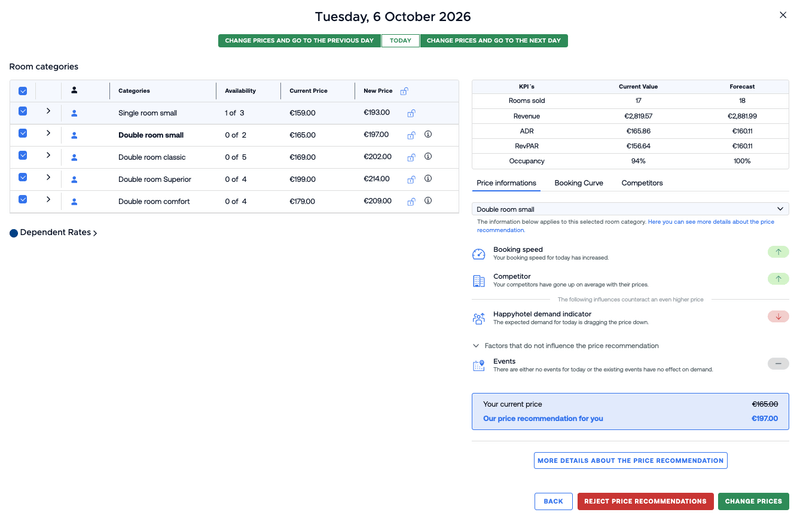
A strong pricing recommendation becomes even more useful when the person responsible for pricing can understand what influenced it and use that information confidently. During a demonstration, you should be able to see why a recommended price changed, which demand signals influenced it and which dates require attention.
Ask the provider to show you why a specific rate changed. Can you identify which factors influenced the recommendation? Can you see whether demand, booking behaviour, competitor rates or events affected the result? Can you tell whether your own pricing settings changed the final recommendation?
At happyhotel, Pricing Transparency is designed to make the factors behind a recommendation visible. Our Pricing Transparency feature shows the initial price recommendation, the factors contributing to it and how settings such as minimum or maximum prices and pricing strategies affect the final result.
See Pricing Transparency at happyhotel: This Is how Our Price Recommendations are Created for the full breakdown. Whichever provider you're evaluating, ask to see the equivalent view before you buy.
For an independent hotel without a dedicated revenue management team, simplicity can be especially important. The goal should not be to add another dashboard your team has to manage. It should be to make pricing decisions easier.

Reporting and Performance Measurement
Think about what you will wan to evaluate once the RMS is live. RevPAR, ADR and occupancy are natural starting points, while pickup, booking pace and forecast information can provide additional context.
The exact reporting requirements depend on your hotel. A single independent property may value a simple view showing important changes and dates that require attention, while a hotel group may need broader reporting across multiple properties. Do not assume more reports automatically mean better software; what matters is whether the reporting helps your team understand performance and identify exceptions quickly.
Onboarding and Ongoing Support
The software itself is only part of the purchase, so it is important to understand what happens after you sign. Ask who handles setup, how much training is included, who needs to be involved from your hotel and how quickly a property like yours can realistically start using the platform.
For a hotel without a dedicated revenue manager, this can make a meaningful difference to how quickly the software becomes part of the daily routine. It is also worth understanding what support is available afterwards and whether you can speak to someone who understands revenue management as well as the product itself.
When comparing providers, look beyond the existence of a help centre or support inbox and understand how much practical help you will receive during implementation and once the system is live.
Multi-Property Capabilities
If you operate several hotels, portfolio functionality deserves its own evaluation. Look at whether the software allows you to understand several properties without forcing every hotel into exactly the same operating model.
Relevant questions may include:
- Can multiple properties be analysed centrally?
- Can users work across more than one hotel?
- Can individual properties retain their own pricing setup?
- Can portfolio-level performance be compared easily?
A platform that works well for a single property will not necessarily work equally well for a hotel group.
Data Protection and Security
Revenue management software needs access to hotel data in order to work, so before purchasing, understand what information is processed, where it is stored and what contractual safeguards are available.
For European hotels in particular, clarify how the provider handles GDPR requirements, where data is hosted, which subprocessors are involved, whether a Data Processing Agreement is available and what happens to your data after the contract ends. You do not need to turn the software evaluation into a legal audit, but these questions should be answered before signing rather than discovered during implementation.
Use a Revenue Management Software Comparison Matrix
Once you know what matters to your hotel, use the same criteria to evaluate every provider. A weighted scorecard gives you a consistent way to compare each provider against the priorities that matter most to your hotel.
Score each shortlisted RMS from 1 to 5 for every criterion, multiply the score by its weighting and compare the results.
| Criterion | Why it matters | Questions to ask | Example weight |
|---|---|---|---|
| PMS integration & data quality | Poor inputs make recommendations less reliable | Does it integrate properly with our PMS? What data is synchronized and how often? | 20% |
| Forecasting & demand signals | Better demand visibility supports better pricing decisions | Which signals influence the forecast? How are events and booking pace considered? | 15% |
| Pricing logic & guardrails | The RMS still needs to follow your pricing strategy | Can we define floors, ceilings and other pricing boundaries? | 15% |
| Automation & control | Determines how much manual work can realistically be removed | Can automation be introduced gradually? Can we override recommendations? | 12% |
| Transparency & usability | Teams need to understand and trust the software | Can users see why a particular rate was recommended? | 10% |
| Reporting | Helps you evaluate performance and identify exceptions | Which KPIs and pricing changes can we monitor? | 8% |
| Onboarding & support | Strong implementation improves time to value | Who handles setup, training and ongoing support? | 10% |
| Multi-property capabilities | Important for hotel groups | Can several properties be analysed effectively while retaining property-level differences? | 5% |
| Total cost of ownership | Subscription price is not the only cost | Are integrations, onboarding or other services charged separately? | 5% |
These weights are examples, not universal recommendations, and the weighting should reflect your own priorities. If saving time is your biggest objective, automation may deserve more weight. If you manage several properties, portfolio capabilities become more important. If your PMS environment is complex, integration may deserve even more than 20%.
The purpose is to make your priorities clear and give every provider the same basis for comparison.
Define Your Must-Haves Before Speaking to RMS Providers
A weighted score alone is not enough. Choose two or three requirements that are genuinely non-negotiable, such as direct integration with your PMS, automatic pricing with configurable guardrails, transparent recommendations, support for several properties or relevant event and demand signals.
Your must-haves help you identify which systems meet the requirements that matter most, even when other platforms perform strongly in different areas. This also makes vendor demos more useful: instead of asking, "Can you show us the platform?", ask, "Can you show us how your software handles the workflows that matter most to our hotel?"
RMS Red Flags to Watch For
No single point automatically means a provider is not the right fit, but some areas may be worth exploring in a little more detail.
- The PMS integration cannot be explained clearly. If the provider cannot tell you which data is exchanged and how the connection works, it will be difficult to assess the quality of the underlying recommendations.
- The system cannot explain its recommendations. You should be able to understand what changed and which factors influenced a rate.
- Automation offers little control. Automated pricing should not mean losing the ability to define the pricing framework your hotel wants to follow.
- You cannot properly evaluate the software before committing. A sales presentation is not the same as seeing how a system behaves for your hotel.
- The full cost is unclear. Make sure you understand subscription fees as well as potential integration, onboarding, add-on or multi-property costs.
- Customer examples bear little resemblance to your property. Results from a large resort may tell you very little about what a 40-room independent city hotel can expect.
None of these automatically makes a provider unsuitable, but each one should lead to more questions before you make a decision.
How to Evaluate Revenue Management Software During a Demo or Evaluation
A polished sales demo shows what a platform can do, while a more hands-on evaluation helps you determine whether it works for your hotel. Where possible, evaluate your strongest candidates using your own hotel data or a realistic representation of your setup.
Check the Data Before Judging the Recommendations
Before deciding whether the pricing output is good, make sure the underlying information is correct. Check whether room types, rate plans, bookings, cancellations, occupancy and historical data are being interpreted properly. Confirming that the underlying information is accurate gives you a stronger basis for evaluating the recommendations.
Test Different Demand Situations
Use several different types of dates when evaluating the software. Look at a normal weekday, a busy weekend, an event date, a low-demand period and a date where bookings are suddenly accelerating.
For each one, ask: would we actually use this recommendation, and can we understand why the software made it?
Test the Everyday Workflow
Imagine using the platform during a normal working day. How quickly can you identify dates that need attention, unusual demand changes, new pricing recommendations, important events and exceptions to your usual strategy?
A useful revenue management software should make the analysis behind pricing decisions easier and more efficient for the team.
Test Automation and Control
Do not just ask whether automated pricing exists; test the controls around it. Try changing a minimum or maximum rate, overriding a recommendation and seeing how the system behaves when automation is active.
You need to understand what happens when you agree with the software - and what happens when you do not.
Evaluate the Provider as Well as the Software
Use the evaluation period to test the relationship too. How quickly are questions answered? Can the team explain why the system behaves the way it does? Is the support focused only on using the interface, or can the team also discuss revenue management questions?
Strong support can become particularly important once pricing automation becomes part of your daily operation.
How Much Does Revenue Management Software Cost?
RMS providers price differently: depending on the vendor, pricing may be based on room count, property count, product package or other models, and what's included varies. Compare the total cost of the configuration you would actually use, including PMS or interface costs, onboarding, competitor-rate tools, additional properties and contract length, not only the monthly subscription. For a full breakdown and a comparison template, see What Should a Hotel RMS Cost and When Does It Pay for Itself?
How Should You Evaluate the ROI of Revenue Management Software?
Rather than starting with a generic industry percentage, build the business case around your own hotel and ask: what would have to improve for this software to pay for itself?
Value may come from capturing more revenue on high-demand dates, avoiding unnecessary discounting, reacting faster to changes in demand, reducing manual pricing work or making pricing more consistent across properties.
When RMS providers share performance results, ask how relevant those examples are to your hotel. A large resort, an airport hotel and a 40-room independent city hotel face very different demand and pricing challenges, so a useful customer example should be reasonably comparable to your property in terms of size, market and operating model.
Market context matters too. The potential return and urgency of an RMS can look very different depending on the market. In a highly competitive market, where hotels are constantly reacting to changes in demand and competitor pricing, faster and more consistent pricing decisions may be especially valuable. In a declining market, the value may be less about growing revenue and more about protecting performance and responding quickly to weaker demand. In a less competitive or "blue ocean" market, where demand is strong and pricing pressure is lower, the immediate need for an RMS may be different. When evaluating ROI, look at the hotel's performance in the context of the wider market rather than at revenue growth alone.
To work out ROI, payback and break-even for your own hotel, see how to calculate RMS ROI and payback.
Understand Implementation Before You Buy
You do not need to design the entire rollout before choosing revenue management software, but you should understand what implementation will require.
Depending on the system, the process may include connecting your PMS, checking the data connection, configuring the account, defining pricing settings, reviewing initial recommendations and deciding how much pricing automation to use.
The exact timeline varies depending on your PMS, hotel setup and the provider itself. One of the most useful questions you can ask during evaluation is therefore: "What would implementation look like specifically for a hotel like ours?" Ask the provider to explain what their team will handle, what input they will need from your hotel and how the process typically develops from setup to daily use.
Questions to Ask Every RMS Provider
Before making a final decision, you should be able to answer these questions:
- Does the software integrate properly with our PMS?
- Which hotel data does it use?
- Which market and demand signals influence its recommendations?
- Can we understand why a price is being recommended?
- Can we define pricing boundaries?
- How much control do we retain over automation?
- How much manual work will still be required?
- What reporting will we have?
- What does implementation involve for our team?
- What training is included?
- What ongoing support is included?
- What will the complete cost be?
- Can we evaluate the software with our own hotel data?
- Can the provider show relevant examples from hotels similar to ours?
If you can answer those questions confidently, you will have a much clearer picture of how each system fits your hotel alongside the individual features it offers.
The Best Revenue Management Software Is the One That Fits Your Hotel
Revenue management software should support better pricing decisions while making the process easier for the team to manage. The right solution should fit your hotel technology, recognise the demand patterns that matter to your property, give you an appropriate level of automation and control, and be straightforward enough that your team will actually use it.
Start with the outcome you want, define your must-haves and compare every provider using the same criteria. Ask them to demonstrate the workflows that matter to your hotel alongside the features and capabilities most relevant to your needs, and wherever possible, evaluate your strongest options using your own hotel data before making the final decision.
If you're not yet at the comparison stage, How to start with revenue management is the place to start instead.
Want to See How happyhotel Fits Your Hotel?
happyhotel analyses hotel and market data, including booking activity, demand, competitor rates and events, to generate room-rate recommendations and automate pricing within the framework you define.
FAQ: Choosing Revenue Management Software for Your Hotel
What is the best revenue management software for an independent hotel?
There is no single RMS that is best for every independent hotel. For many independent properties, ease of use, PMS integration, automation, pricing transparency and access to good support matter more than an extensive enterprise feature set. The best software is the one that fits your pricing needs without creating unnecessary operational complexity.
Does revenue management software need to integrate with my PMS?
For most hotels, PMS integration is one of the most important requirements. Pricing recommendations depend on accurate information about bookings, occupancy, room types, rates and availability, so the quality of that connection should be evaluated carefully.
Should I choose automated revenue management software?
Automation can remove a significant amount of repetitive pricing work, but the right level depends on how your hotel wants to operate. Look beyond whether an RMS offers "autopilot" and evaluate the controls around it: pricing boundaries, overrides, visibility into changes and the ability to maintain your own pricing strategy.
Should I choose AI-powered revenue management software?
AI can support areas such as forecasting, demand analysis and pricing. When evaluating an AI-powered RMS, look at how the technology uses hotel and market data, responds to changing demand and contributes to recommendations your team can understand and use.
How long does it take to implement revenue management software?
There is no universal implementation timeline. It can depend on PMS integration, hotel setup and the provider's onboarding process. Ask each provider for an implementation plan based on a property similar to yours rather than relying on a generic estimate.
Which KPIs should I use to measure RMS performance?
RevPAR, ADR and occupancy are useful starting points, while pickup and booking pace can provide additional insight. The most important metrics are ultimately the ones connected to the reason you introduced revenue management software in the first place.


